Battery health for Android

Know how much battery you really have.

Know My Battery measures your battery's real capacity from your own charges and drains, then tells you in plain words how healthy it is, what's draining it, and how to make it last.

  • Free
  • No root
  • No account
  • No ads
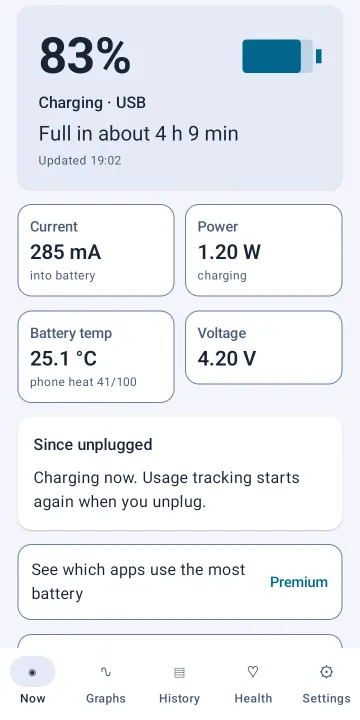
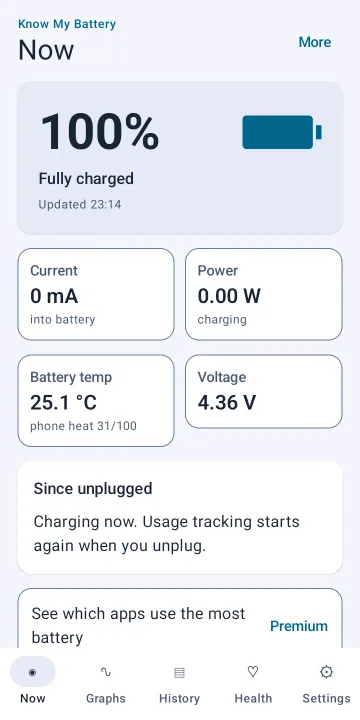
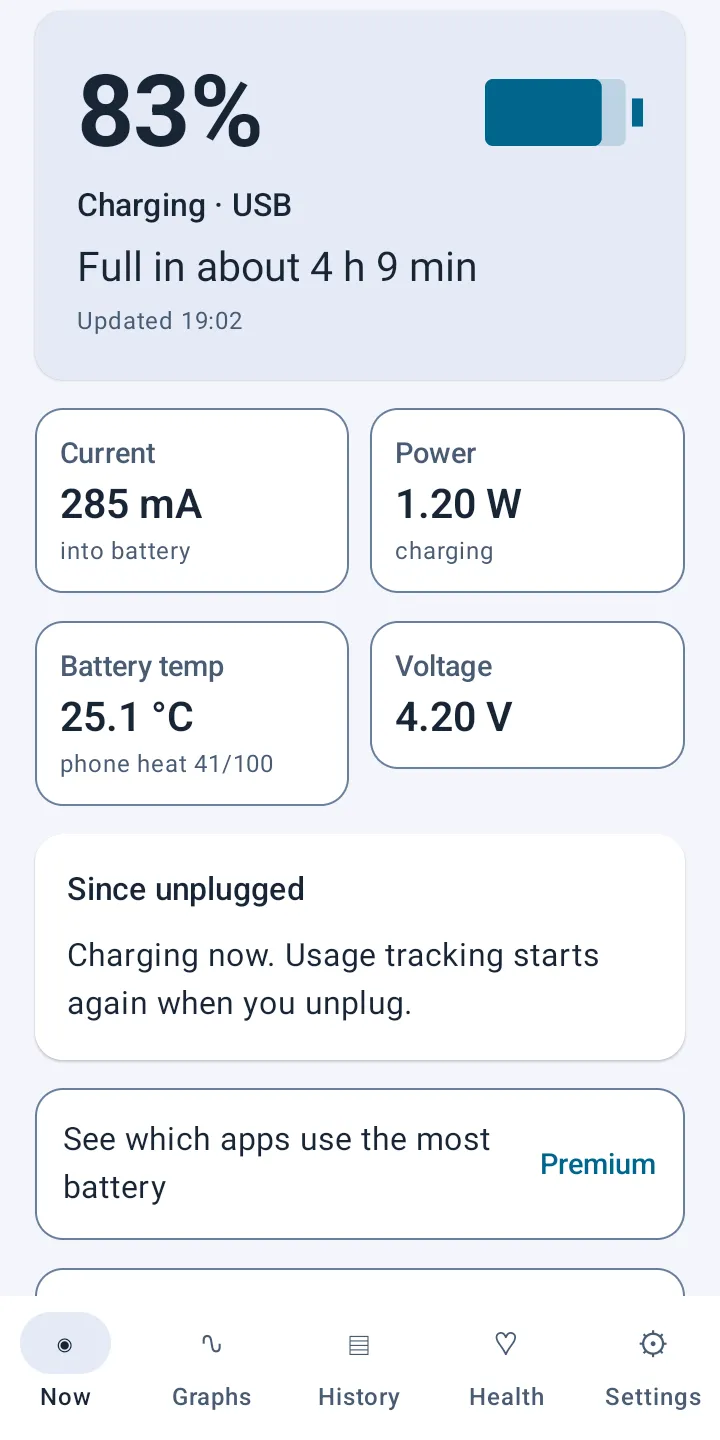
Know My Battery Now screen: 83% charging over USB, 285 mA into the battery, 1.20 W, 25.1 °C and 4.20 V
Real screenshots from a moto g 5G (2022). Your phone's numbers will differ.
1%Charge measured between each exact 1% step
20%Any charge or drain this size becomes a measurement
0Accounts to create, and no ads
8.0+Works on Android 8.0 and later
Features

Everything your battery is doing, in plain words

Know My Battery reads your battery through Android's own public readings and records them in the background, so the numbers come from your phone and your habits.

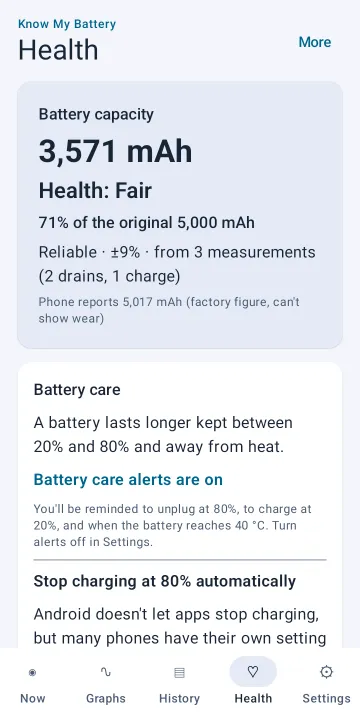
Health tab: battery capacity 3,571 mAh, health Fair, 71% of the original 5,000 mAh, reliable from 3 measurements
Health

Real capacity and health, with the confidence shown

The app adds up the charge flowing in or out between each exact 1% step, during normal use. Several charges and drains are combined into one capacity figure in mAh, compared with your phone's original capacity.

  • Health as a rating and a percentage of the original capacity
  • Marked reliable only after several measurements, with the margin shown
  • The phone's own factory figure shown separately, because it can't show wear
How the Health tab works
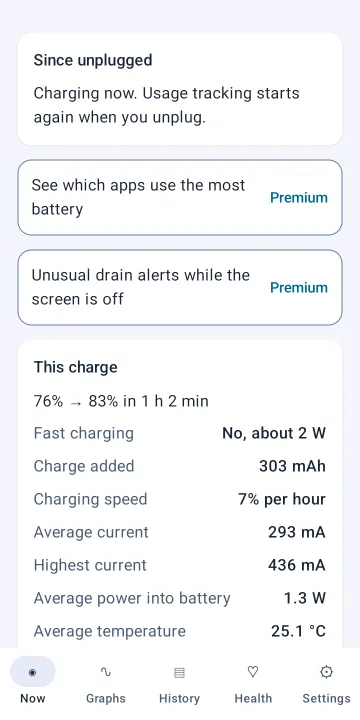
This charge card: 76% to 83% in 1 h 2 min, not fast charging, 303 mAh added, 7% per hour, average 293 mA
Now

Live readings and every charge, measured

See current in and out of the battery, power, voltage and temperature as they change, plus time to full or time left worked out from how you're using the phone right now.

  • Charge added, charging speed, average and highest current
  • Fast charging detected from what actually reaches the battery
  • How much you've used since you last unplugged
How the Now tab works
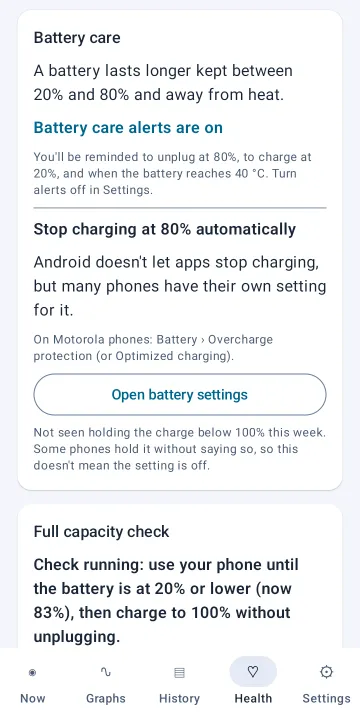
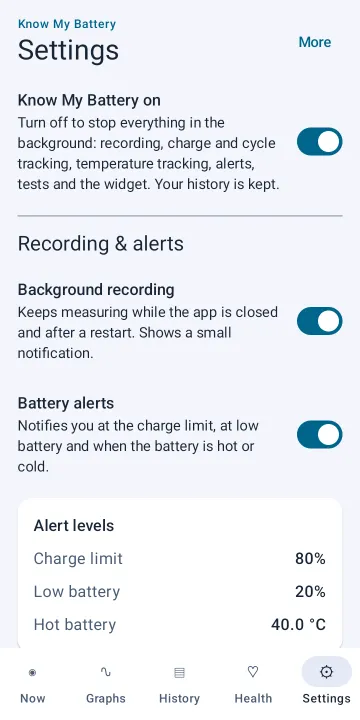
Battery care card: alerts on for 80%, 20% and 40 °C, and where to find the phone's own charge limit setting
Battery care

Habits that make a battery last, in one tap

Batteries last longer kept between 20% and 80% and away from heat. One tap turns on reminders to unplug at 80%, to charge at 20% and to cool down at 40 °C.

  • Shows where your phone's own "stop at 80%" setting is
  • Notices when your phone held the charge below full
  • Honest about limits: Android doesn't let apps stop charging
How Battery care works
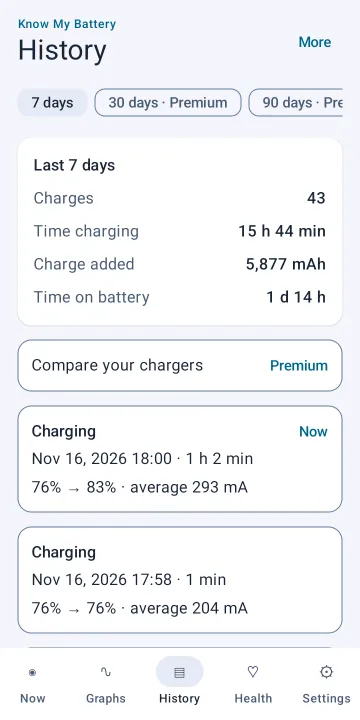
History tab: last 7 days with 43 charges, 15 h 44 min charging, 5,877 mAh added, and a list of charge sessions
History

A week of charges at a glance

Background recording keeps measuring while the app is closed and after a restart. Every charge and discharge becomes a session you can open, with its speed and the charge it added.

  • 7 days of history free; full history with Premium
  • Time charging, time on battery and charge added
  • Export to CSV with Premium
How the History tab works
Honest numbers

Measured, not guessed

Battery apps often show a health figure without saying where it came from. Know My Battery tells you how each number was measured and how sure it is.

  • Measured from your own use

    Any charge or drain of 20% or more without a recording break counts, so normal use is enough. No special routine needed.

  • Confidence shown with every result

    Capacity is marked reliable only after several measurements, and estimates are labelled as estimates.

  • Checks its own sensors

    If your phone's temperature or current sensor doesn't behave like a real sensor, the app says so instead of showing misleading numbers.

  • Clear about what an app can't do

    Android doesn't let apps stop charging. Instead of pretending, Know My Battery reminds you and points you to your phone's own setting.

  • Gentle on your battery

    While charging, the phone is kept awake only until it's full, so measurements have no gaps. On battery, it sleeps normally.

  • Private by design

    No account and no ads. Your recordings stay on your phone, and you can export or delete them any time.

Getting started

Check your battery health in three steps

No cables and no special routine. Use your phone as you normally do and Know My Battery does the measuring.

  1. Turn on background recording

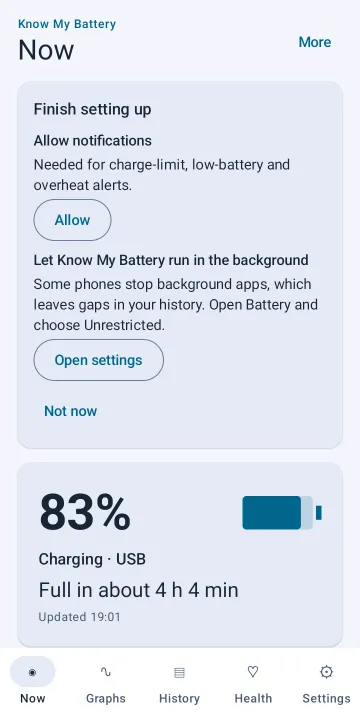
    The first screen walks you through it: allow notifications and let the app run in the background, so it can record while it's closed.

  2. Charge and use your phone as usual

    Every charge or drain of 20% or more becomes a capacity measurement. Want a faster answer? Start a full capacity check from the Health tab.

  3. See your battery's real capacity

    Enter your phone's original capacity once, and the Health tab shows how much your battery holds today, as a rating and a percentage.

Pricing

Free, with an optional one-time Premium

The Free version measures, records and explains your battery with no time limit. Premium adds deeper analysis for people who want it. One purchase, no subscription.

Free

Free forever

  • Live current, power, voltage and temperature
  • Background recording with 7 days of history and charge sessions
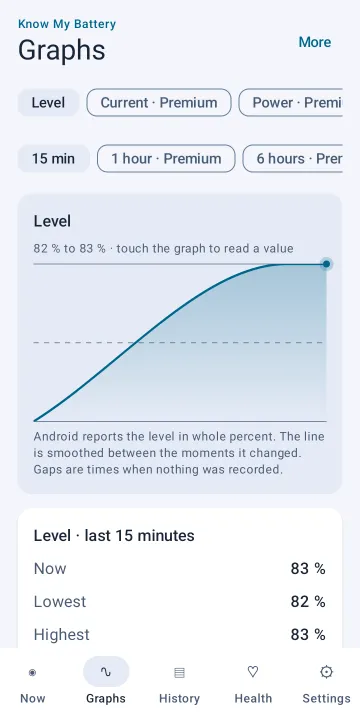
  • Battery level graph (last 15 minutes)
  • Real capacity and health from your charges and drains
  • Full capacity check and drain measurement
  • Battery care alerts at 80%, 20% and 40 °C
  • Charge cycles, time to full and time left
One-time

Premium

One purchase on Google Play

  • Full history, and graphs of current, power, temperature and voltage over 1, 6 and 24 hours
  • Which apps use the most battery
  • Alerts for unusual drain while the screen is off
  • Battery wear habits score, with tips
  • Battery health report to save or share (PDF)
  • Capacity over time and charger comparison
  • Battery test under load
  • Your own alert levels, home screen widget and live notification
  • Three more themes, CSV and JSON export, full backup and restore
FAQ

Common questions

Short answers here. The full FAQ covers measurements, charging, privacy, Premium and troubleshooting.

How accurate is the health figure?

It depends on your phone's own battery readings. The app measures the charge between exact 1% steps and combines several charges and drains. It shows how confident the result is, and it's an estimate, not a laboratory test. Some phones report readings the app can't use; when that happens, the app tells you.

Will it drain my battery?

Background recording is designed to be light. While charging, it keeps the phone awake only until the battery is full so charge measurements have no gaps. On battery, the phone sleeps normally unless you start a drain measurement.

Can it stop charging at 80%?

No Android app can do that without root. Many phones have their own setting for it, and Know My Battery shows you where to find it and reminds you to unplug.

Where is my data stored?

On your phone only. There's no account and no ads, and the app doesn't send your recordings anywhere. Read the privacy policy for details.

See all questions

Meet your battery properly.

Know My Battery is coming soon to Google Play. Want to hear when it's out, or have a question first? Send us a message.

Coming soon to Google Play Contact us